

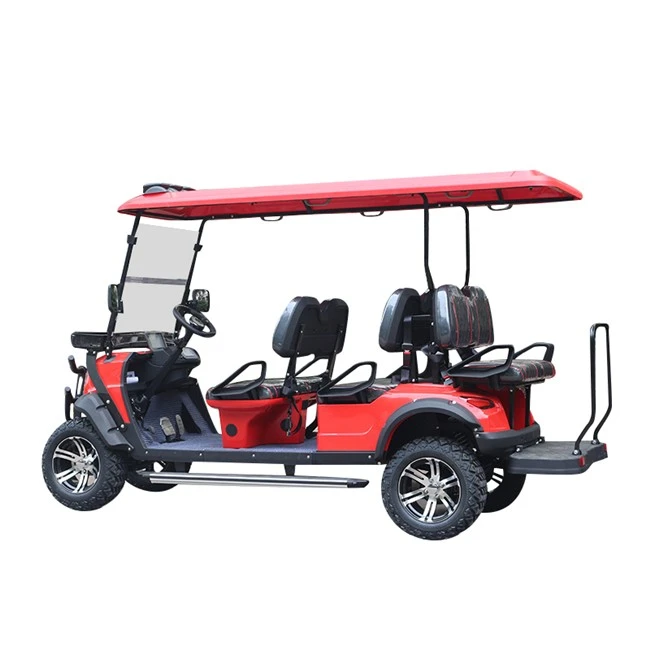
Hey there! As a supplier of 6 - person electric golf carts, I've seen my fair share of issues that owners run into. These carts are super convenient for getting around the golf course or even for some light off - road adventures, but like any vehicle, they can have their problems. In this blog, I'll walk you through how to troubleshoot some common problems you might face with a 6 - person electric golf cart.
Battery - related Issues
One of the most common problems with electric golf carts is battery issues. After all, the battery is the heart of the cart, providing the power it needs to run.
Dead or Weak Battery
If your cart won't start or is moving really slowly, a dead or weak battery could be the culprit. First things first, check the battery connections. Over time, these connections can get loose or corroded. Use a wrench to make sure the terminals are tight and clean off any corrosion with a wire brush and a mixture of baking soda and water.
Another thing to check is the battery water level. Most lead - acid batteries in golf carts need to have the water level maintained. Make sure the water covers the battery plates but isn't overfilled. If the water is low, add distilled water to bring it up to the proper level.
If your battery is old, it might just be time for a replacement. Batteries in electric golf carts usually last around 3 - 5 years, depending on how well they're maintained. You can test the battery's voltage with a multimeter. A fully charged 6 - volt battery should read around 6.3 volts, and a 12 - volt battery should read about 12.6 volts. If the voltage is significantly lower, it's likely time for a new battery.
Battery Won't Charge
If your battery won't charge, there are a few things to check. Start by looking at the charger. Make sure it's plugged in properly and that the power outlet is working. Try plugging another device into the outlet to confirm.
Next, check the charger for any visible damage. If there are frayed wires or a broken plug, you'll need to replace the charger. Also, check the charging port on the golf cart. Sometimes, debris can get into the port and prevent a good connection. Use a can of compressed air to blow out any dirt or dust.
Motor and Controller Problems
The motor and controller are responsible for making the cart move, so any issues here can really affect its performance.
Cart Not Moving
If your cart won't move at all, it could be a problem with the motor or the controller. First, check the fuses. A blown fuse can prevent power from reaching the motor. Locate the fuse box on your cart and check each fuse. If a fuse is blown, replace it with a new one of the same amperage.
Another thing to check is the motor's wiring. Look for any loose or damaged wires. Sometimes, the vibrations from driving can cause wires to come loose. If you find a loose wire, reconnect it and make sure it's secure.
If the wiring and fuses seem fine, the problem might be with the controller. The controller regulates the power going to the motor. You can test the controller with a diagnostic tool, but this can be a bit technical. If you're not comfortable doing it yourself, it's best to take the cart to a professional.
Erratic Movement
If your cart is moving erratically, speeding up and slowing down on its own, the controller could be the problem. This could be due to a software glitch or a hardware issue. Try resetting the controller by turning off the cart, disconnecting the battery for a few minutes, and then reconnecting it.
If that doesn't work, you might need to update the controller's software. Some modern controllers can be updated via a USB port. Check the manufacturer's website for any available updates.
Brake Problems
Brakes are crucial for your safety when driving a golf cart. If you notice any issues with the brakes, it's important to address them right away.
Brakes Not Stopping Properly
If your brakes aren't stopping the cart as quickly as they should, check the brake pads. Over time, brake pads wear down and need to be replaced. Look at the thickness of the brake pads. If they're less than 1/8 of an inch thick, it's time for new ones.
Also, check the brake fluid level if your cart has hydraulic brakes. Low brake fluid can cause the brakes to be less effective. If the fluid is low, add the recommended brake fluid to the reservoir.
Squeaking or Grinding Brakes
Squeaking or grinding brakes are usually a sign of worn brake pads. As the pads wear down, the metal backing can start to rub against the brake rotors, causing the noise. Replace the brake pads as soon as possible to prevent further damage to the rotors.
Steering Problems
Good steering is essential for a smooth and safe ride in your golf cart.
Hard to Turn the Steering Wheel
If it's hard to turn the steering wheel, check the steering fluid level if your cart has power steering. Low fluid can make the steering feel stiff. Add the appropriate steering fluid to the reservoir if it's low.
Another possible cause is a problem with the steering linkage. Look for any loose or damaged parts in the steering linkage. Tighten any loose bolts or replace any damaged components.
Loose Steering
If the steering feels loose, there could be play in the steering column or the steering linkage. Check the steering column for any loose bolts or nuts and tighten them. Also, inspect the steering linkage for worn bushings or ball joints. Replace any worn parts to restore proper steering.
Electrical Problems
In addition to battery issues, there can be other electrical problems in your golf cart.
Lights Not Working
If your lights aren't working, start by checking the bulbs. Replace any burnt - out bulbs with new ones of the same wattage.
Next, check the light switches. Sometimes, a faulty switch can prevent the lights from turning on. You can test the switch with a multimeter to see if it's working properly.
Other Electrical Accessories Not Working
If other electrical accessories like the horn or radio aren't working, check the fuses related to those accessories. A blown fuse can cause the accessory to stop working.
Also, check the wiring for any loose connections or damage. Sometimes, a loose wire can prevent power from reaching the accessory.

Conclusion
Well, there you have it! These are some of the most common problems you might face with a 6 - person electric golf cart and how to troubleshoot them. Of course, if you're ever unsure or if the problem is too complicated to fix on your own, it's always a good idea to consult a professional.
If you're in the market for a new 6 - person electric golf cart or need parts and accessories for your existing one, we've got you covered. We offer a wide range of high - quality Off Road Electric Golf Cart, 3000W Electric Golf Cart Scooters, and 4KW Off Road Golf Cart Electric. Don't hesitate to reach out if you have any questions or want to discuss your specific needs. We're here to help you get the most out of your golf cart.
References
- Golf Cart Maintenance Manuals
- Online forums for golf cart owners
- Manufacturer's websites for specific models of 6 - person electric golf carts